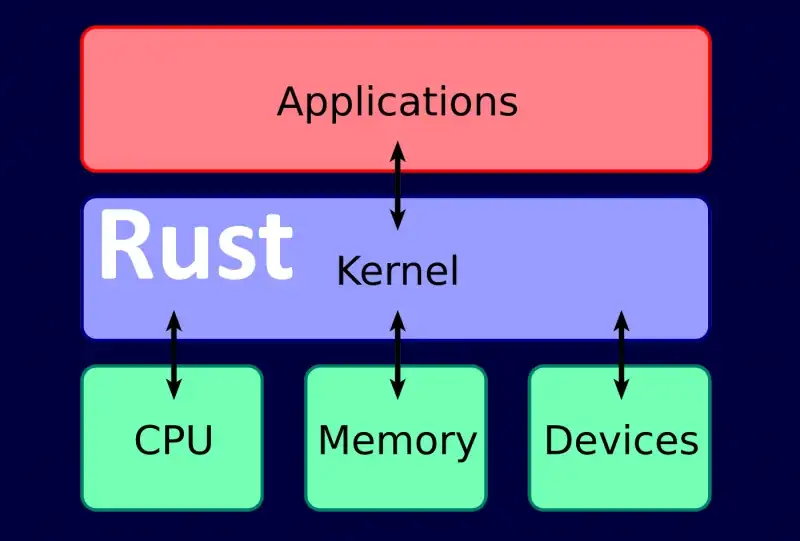
Intro to Windows Kernel Driver Development in Rust
Contents
- Introduction
- Dependencies
- Development
- Configuration
- Implementation
- Deployment and testing
- Summary
- References
Introduction
Hi! Glad you’re here. In this post we’ll build a tiny Windows kernel driver using Rust. Yes, that Rust. Trendy, loud, and actually useful.
This article stays on the safe, foundational side: toolchain setup, linking against the WDK, no_std, a minimal driver entry point, and kernel debug output via DbgPrint. From here you can move on to legitimate next steps like IOCTL handling, device objects, IRP dispatch routines, and real driver architecture.
If you don’t know Rust yet, you’ll still be fine: I’ll also show a comparable C++ example. All you need is time, C/C++ experience, and basic understanding of kernel-mode development.
Why Rust? Because it can deliver performance close to C/C++ while providing strong memory safety guarantees at the language level. Many large organizations are investing in memory-safe code and Rust in particular, and the Rust ecosystem ships fast with stable releases every ~6 weeks and a separate nightly channel.
⚠️ Ethics & safety noteKernel drivers run with extreme privileges. Use these techniques for learning, research, and legitimate development only.
Dependencies
To follow along (or to copy/paste), install:
- Rust: https://www.rust-lang.org/tools/install
- Windows SDK: https://developer.microsoft.com/windows/downloads/windows-sdk/
- Windows WDK: https://learn.microsoft.com/windows-hardware/drivers/download-the-wdk
- Sysinternals Suite (DebugView): https://learn.microsoft.com/sysinternals/downloads/sysinternals-suite
You’ll also want a VM (VMWare, Hyper-V, VirtualBox, QEMU) with Windows 10 x64 or Windows 11, test signing enabled, and kernel debugging enabled.
Enable test mode and kernel debugging, then reboot:
⚠️ Run the terminal as Administrator
# Enable Test Signing mode
bcdedit -set TESTSIGNING ON

# Enable kernel debugging
bcdedit /debug on
Development
Configuration
Create a new Rust library project:
cargo new hello-win-kernel --libProject structure:
hello-win-kernel/
  src/lib.rs
  .gitignore
  Cargo.toml
In Rust, main.rs is the entry point for binaries, and lib.rs is the entry point for libraries. We’ll build a driver as a dynamic library artifact.
Edit Cargo.toml:
- Add a
[lib]section and setcrate-type = ["cdylib"]so Rust produces a C-compatible dynamic library. - Set
panic = "abort"for both debug and release profiles to avoid unwind behavior. - Add
winregas a build dependency for reading WDK/Windows Kits paths from the registry inbuild.rs.
Cargo.toml
[package]
name = "hello-win-kernel"
version = "0.1.0"
edition = "2021"

[lib]
path = "src/lib.rs"
crate-type = ["cdylib"]

[profile.dev]
panic = "abort"

[profile.release]
panic = "abort"

[build-dependencies]
winreg = "0.50.0"
Create a rust-toolchain file in the project root to force nightly (we need nightly-only flags during linking):
rust-toolchain
nightlyAdd a build script to locate WDK libraries
To build a driver, we need to link against some WDK libraries (for example, ntoskrnl). We’ll add library search paths at build time via build.rs.
Create build.rs:
build.rs
extern crate winreg;

use std::env::var;
use std::error::Error;
use std::fmt;
use std::path::{Path, PathBuf};
use winreg::enums::*;
use winreg::RegKey;

const WIN_KITS_KEY: &str = r"SOFTWARE\Microsoft\Windows Kits\Installed Roots";

#[derive(Debug)]
struct BuildError {
    msg: String,
}

impl Error for BuildError {}

impl fmt::Display for BuildError {
    fn fmt(&self, f: &mut fmt::Formatter) -> fmt::Result {
        write!(f, "BuildError: {}", self.msg)
    }
}

fn get_windows_kits_dir() -> Result<PathBuf, BuildError> {
    let hklm = RegKey::predef(HKEY_LOCAL_MACHINE);
    match hklm.open_subkey(WIN_KITS_KEY) {
        Ok(key) => match key.get_value::<String, _>("KitsRoot10") {
            Ok(dir) => Ok(dir.into()),
            Err(_) => Err(BuildError {
                msg: format!("Cannot get value: {}", WIN_KITS_KEY),
            }),
        },
        Err(_) => Err(BuildError {
            msg: format!("Cannot open subkey: {}", WIN_KITS_KEY),
        }),
    }
}

fn get_km_dir(windows_kits_dir: &PathBuf) -> Result<PathBuf, BuildError> {
    match Path::new(windows_kits_dir).join("lib").read_dir() {
        Ok(read_dir) => {
            match read_dir
                .filter_map(|dir| dir.ok())
                .map(|dir| dir.path())
                .filter(|dir| {
                    dir.components()
                        .last()
                        .and_then(|c| c.as_os_str().to_str())
                        .map(|c| c.starts_with("10.") && dir.join("km").is_dir())
                        .unwrap_or(false)
                })
                .max()
                .ok_or_else(|| format!("Cannot find a valid km dir in `{:?}`", windows_kits_dir))
            {
                Ok(max_lib_dir) => Ok(max_lib_dir.join("km")),
                Err(msg) => Err(BuildError { msg }),
            }
        }
        Err(_) => Err(BuildError {
            msg: format!("Cannot read dir: {:?}", windows_kits_dir),
        }),
    }
}

fn main() {
    let windows_kits_dir = get_windows_kits_dir().unwrap();
    let km_dir = get_km_dir(&windows_kits_dir).unwrap();

    let target = var("TARGET").unwrap();
    let arch = if target.contains("x86_64") {
        "x64"
    } else if target.contains("i686") {
        "x86"
    } else {
        panic!("Only x64 and x86 are supported!");
    };

    let wdk_lib_dir = km_dir.join(arch);

    println!(
        "cargo:rustc-link-search=native={}",
        wdk_lib_dir.to_str().unwrap()
    );
}
Linker configuration for a driver build
Create a .cargo folder and add a config file. Cargo supports config.toml (preferred) and older config.
.cargo/config.toml
[build]
target = "x86_64-pc-windows-msvc"

rustflags = [
  # Pre-link args (nightly-only via -Z)
  "-Z", "pre-link-arg=/NOLOGO",
  "-Z", "pre-link-arg=/NXCOMPAT",
  "-Z", "pre-link-arg=/NODEFAULTLIB",
  "-Z", "pre-link-arg=/SUBSYSTEM:NATIVE",
  "-Z", "pre-link-arg=/DRIVER",
  "-Z", "pre-link-arg=/DYNAMICBASE",
  "-Z", "pre-link-arg=/INCREMENTAL:NO",
  "-Z", "pre-link-arg=/MANIFEST:NO",
  "-Z", "pre-link-arg=/PDBALTPATH:none",

  # Post-link args
  "-C", "link-arg=/OPT:REF,ICF",
  "-C", "link-arg=/ENTRY:driver_entry",
  "-C", "link-arg=/MERGE:.edata=.rdata",
  "-C", "link-arg=/MERGE:.rustc=.data",
  "-C", "link-arg=/INTEGRITYCHECK",
]
Implementation
Rust doesn’t ship a usable standard library in kernel mode, so we disable it with #![no_std]. We also implement a custom panic handler and provide a couple of symbols to satisfy the MSVC linker in this minimal setup.
Create src/lib.rs:
src/lib.rs
#![no_std]

mod dbg;
mod ntstatus;
mod types;

use ntstatus::*;
use types::*;

// Fixes linker expectations in some configurations.
#[no_mangle]
pub extern "system" fn __CxxFrameHandler3(
    _: *mut u8,
    _: *mut u8,
    _: *mut u8,
    _: *mut u8,
) -> i32 {
    0
}

// Fixes linker expectations. Floating-point is generally discouraged in kernel drivers.
#[export_name = "_fltused"]
static _FLTUSED: i32 = 0;

// Panic handler (no std, no unwinding)
#[cfg(not(test))]
#[panic_handler]
fn panic(_info: &core::panic::PanicInfo) -> ! {
    loop {}
}

// Driver entry point
#[no_mangle]
pub extern "system" fn driver_entry(_driver: PVOID, _path: PVOID) -> NTSTATUS {
    kd_print!("Hello, world!\n");
    STATUS_SUCCESS
}
Add basic Windows type aliases:
src/types.rs
pub type NTSTATUS = u32;
pub type PCSTR = *const u8;
pub type PVOID = *mut core::ffi::c_void;
Add a minimal NTSTATUS constant:
src/ntstatus.rs
use crate::types::*;

pub const STATUS_SUCCESS: NTSTATUS = 0x00000000;
Kernel debug output with DbgPrint
Now we’ll import DbgPrint from ntoskrnl and wrap it with a small macro so we don’t forget the null terminator.
src/dbg.rs
use crate::types::*;

#[link(name = "ntoskrnl")]
extern "C" {
    #[allow(dead_code)]
    pub fn DbgPrint(format: PCSTR, ...) -> NTSTATUS;
}

#[macro_export]
#[cfg(debug_assertions)]
macro_rules! kd_print {
    ($string: expr) => {
        unsafe {
            $crate::dbg::DbgPrint(concat!("[hello_win_kernel.sys] ", $string, "\0").as_ptr())
        }
    };

    ($string: expr, $($x:tt)*) => {
        unsafe {
            $crate::dbg::DbgPrint(
                concat!("[hello_win_kernel.sys] ", $string, "\0").as_ptr(),
                $($x)*
            )
        }
    };
}

#[macro_export]
#[cfg(not(debug_assertions))]
macro_rules! kd_print {
    ($string: expr) => {};
    ($string: expr, $($x:tt)*) => {};
}
At this point you can build successfully. Next we’ll automate renaming/signing and test loading.
Deployment and testing
To test a driver in a VM, you usually need to:
- Build the
.dllartifact - Rename it to
.sys - Sign it (test certificate is enough for test mode)
- Load it as a service and verify output
We’ll automate these steps with cargo-make.
Install it:
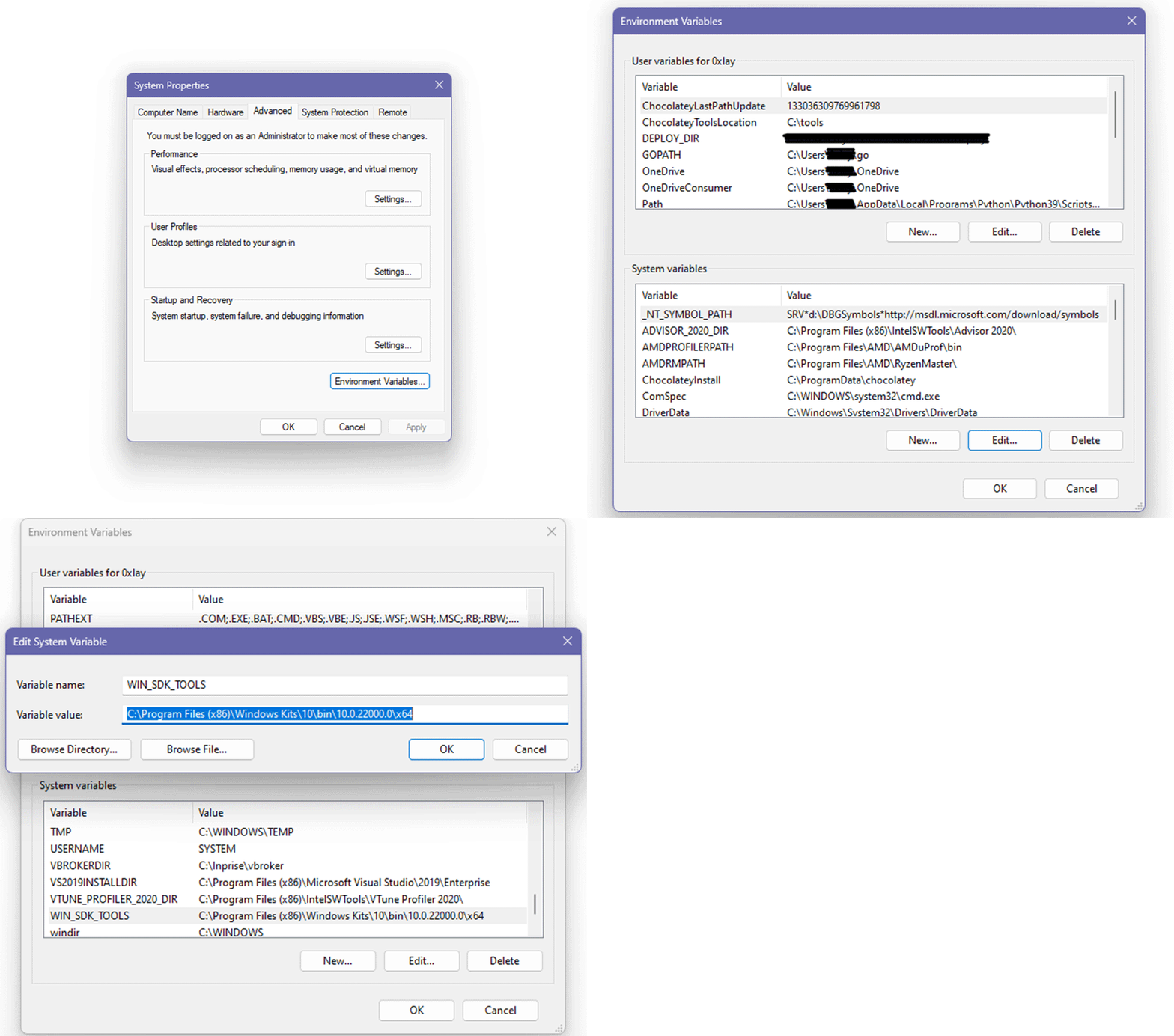
cargo install cargo-makeConfigure Windows SDK tools path
Create a system environment variable named WIN_SDK_TOOLS pointing to your Windows SDK tools folder.
Steps:
- Open View advanced system settings
- Go to Advanced tab
- Click Environment Variables
- Under System variables, click New
- Name it
WIN_SDK_TOOLS - Set the value to the Windows SDK tools path
- Click OK
Add a cargo-make script
Create makefile.toml in the project root:
makefile.toml
[env.development]
TARGET_PATH = "target/x86_64-pc-windows-msvc/debug"

[env.release]
TARGET_PATH = "target/x86_64-pc-windows-msvc/release"
BUILD_FLAGS = "--release"

[tasks.build-driver]
script = [
  "cargo build %BUILD_FLAGS%"
]

[tasks.rename-driver]
dependencies = ["build-driver"]
ignore_errors = true
script = [
  "cd %TARGET_PATH%",
  "rename hello_win_kernel.dll hello_win_kernel.sys"
]

[tasks.sign-driver]
dependencies = ["build-driver", "rename-driver"]
script = [
  ""%WIN_SDK_TOOLS%\\makecert.exe" -r -pe -ss PrivateCertStore -n "CN=hello_win_kernel_cert" hello_win_kernel_cert.cer",
  ""%WIN_SDK_TOOLS%\\signtool.exe" sign /fd sha256 /v /s PrivateCertStore /n "hello_win_kernel_cert" /t http://timestamp.digicert.com /a %TARGET_PATH%/hello_win_kernel.sys"
]

[tasks.deploy]
dependencies = ["sign-driver"]
script = [
  "mkdir bin",
  "move hello_win_kernel_cert.cer bin\\hello_win_kernel_cert.cer",
  "move %TARGET_PATH%\\hello_win_kernel.sys bin\\hello_win_kernel.sys"
]

[tasks.cleanup]
script = [
  "rmdir /s /q bin",
  "cargo clean"
]
Build, rename, sign, and deploy:
cargo make deployClean everything:
cargo make cleanupSign only:
cargo make sign-driverTest in a Windows VM
Ensure test signing and kernel debugging are enabled (and reboot if you changed settings):
bcdedit -set TESTSIGNING ON
bcdedit /debug on
Copy to the VM:
bin/hello_win_kernel.sysbin/hello_win_kernel_cert.cer- Sysinternals
DebugView.exe
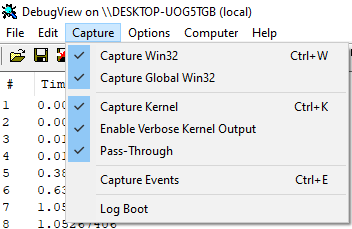
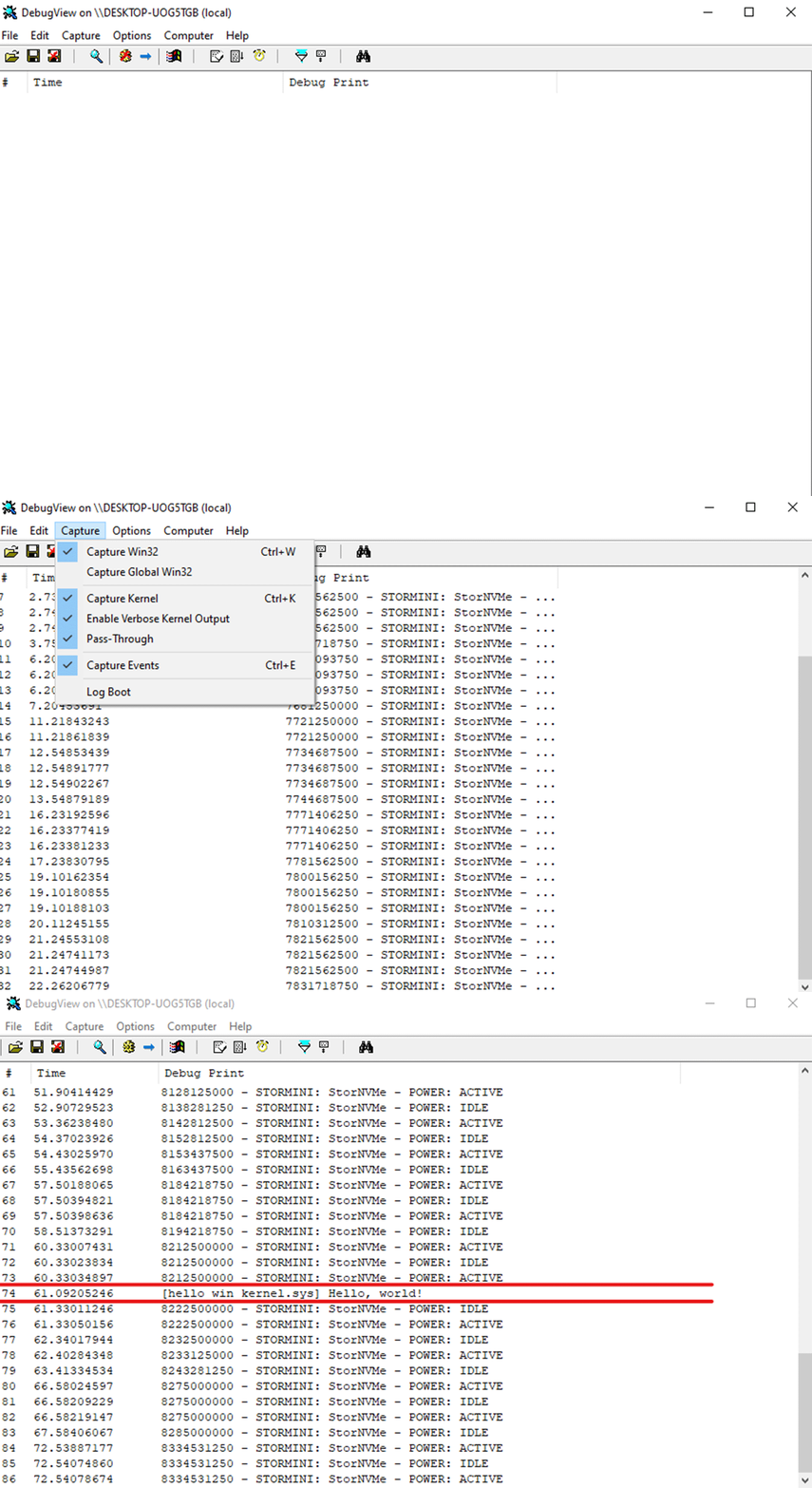
In DebugView:
- Enable Capture
- Check Capture Kernel
- Enable Verbose Kernel Output
 Register the driver service:
sc create hello_win_kernel binPath= "FullPath\hello_win_kernel.sys" type= kernel start= demandStart it:
sc start hello_win_kernelIf everything is correct, DebugView will show:
[hello_win_kernel.sys] Hello, world!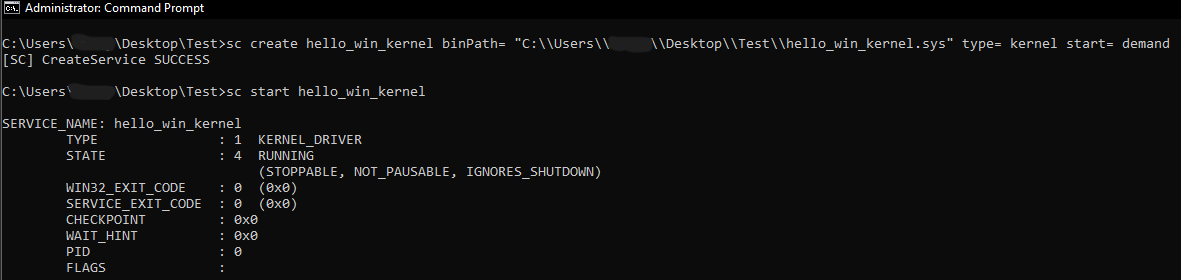
C++ comparison (hello world driver)
For reference, here is the minimal equivalent driver entry in C++:
#include <wdm.h>

extern "C" {
    DRIVER_INITIALIZE DriverEntry;
}

#ifdef ALLOC_PRAGMA
#pragma alloc_text(INIT, DriverEntry)
#endif

_Use_decl_annotations_
NTSTATUS DriverEntry([[maybe_unused]] PDRIVER_OBJECT DriverObject,
                     [[maybe_unused]] PUNICODE_STRING RegistryPath)
{
    DbgPrint("[hello-win-kernel-cpp.sys] Hello, World!\n");
    return STATUS_SUCCESS;
}
Summary
You’ve built a minimal Windows kernel driver in Rust: configured nightly, linked against WDK libraries, implemented a no_std entry point, and validated kernel output via DebugView. Rust can feel more “manual” than C/C++ in this space today, but it offers powerful language-level safety tools that are worth the setup cost.
From here, the most productive next steps are legitimate driver primitives:
- creating a device object and symbolic link
- implementing IRP dispatch routines
- IOCTL communication
- safe wrappers around kernel APIs
- logging and structured error handling patterns for
no_std
References
- Cargo build scripts: https://doc.rust-lang.org/cargo/reference/build-scripts.html
- MSVC linker options: https://learn.microsoft.com/cpp/build/reference/linker-options?view=msvc-170
- WDK download: https://learn.microsoft.com/windows-hardware/drivers/download-the-wdk
- Sysinternals Suite: https://learn.microsoft.com/sysinternals/downloads/sysinternals-suite