The Portable Executable (PE) format
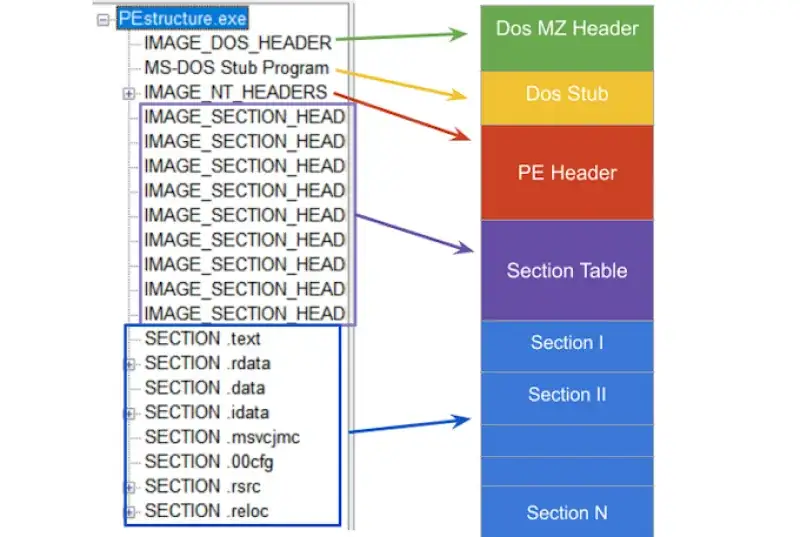
The Portable Executable (PE) format is the standard file format used by Windows for executables such as .exe and .dll. It was introduced with Windows NT (1993) and became the unified layout for both 32-bit and 64-bit programs.A solid understanding of PE internals is a prerequisite for building security tooling on Windows, including antivirus engines, static analyzers, unpackers, and incident response utilities.
PE at a glance
A typical PE file contains:
- DOS header (
IMAGE_DOS_HEADER) for legacy compatibility and for locating the NT header. - NT headers (
IMAGE_NT_HEADERS32/64), which include:IMAGE_FILE_HEADERIMAGE_OPTIONAL_HEADER32/64(the name is historical, it is effectively mandatory for PE images)
- Section table (array of
IMAGE_SECTION_HEADER) - Sections such as
.text,.rdata,.data,.rsrc, etc - Data directories (import, export, resources, relocations, debug, TLS, …) Most PE-related structures and constants are declared in WinNT.h.
IMAGE_DOS_HEADER
IMAGE_DOS_HEADER is a legacy structure for MS-DOS compatibility. In practice, the two most important fields are:
e_magicSignature that identifies the DOS header. For PE files it must be 0x5A4D which corresponds to ASCII "MZ" (IMAGE_DOS_SIGNATURE).e_lfanewFile offset (from the beginning of the file) to the NT headers (IMAGE_NT_HEADERS).
typedef struct _IMAGE_DOS_HEADER {
  WORD  e_magic;    // 0x5A4D ("MZ")
  WORD  e_cblp;
  WORD  e_cp;
  WORD  e_crlc;
  WORD  e_cparhdr;
  WORD  e_minalloc;
  WORD  e_maxalloc;
  WORD  e_ss;
  WORD  e_sp;
  WORD  e_csum;
  WORD  e_ip;
  WORD  e_cs;
  WORD  e_lfarlc;
  WORD  e_ovno;
  WORD  e_res[4];
  WORD  e_oemid;
  WORD  e_oeminfo;
  WORD  e_res2[10];
  DWORD e_lfanew;   // offset of IMAGE_NT_HEADERS
} IMAGE_DOS_HEADER, *PIMAGE_DOS_HEADER;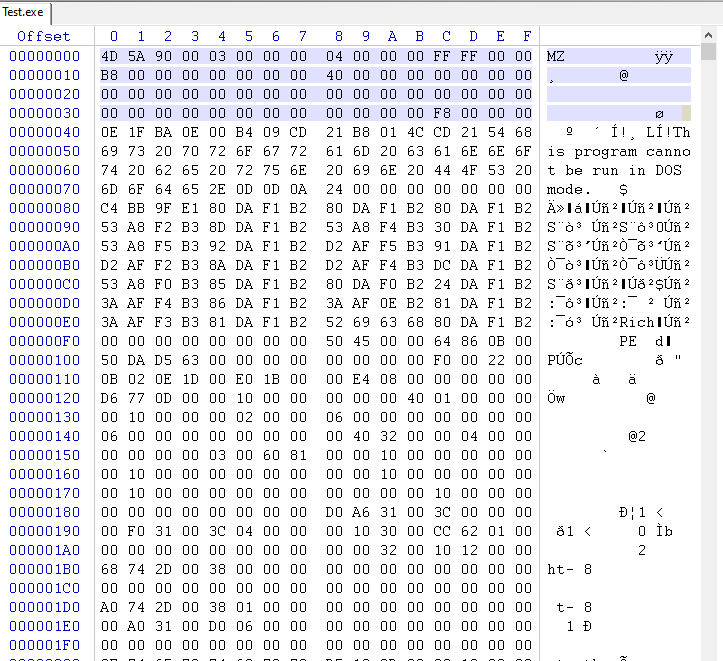
History of the "MZ" signature
In the early 1980s, MS-DOS needed a simple method to distinguish executable files from other file types. The "magic number" MZ was chosen and written at the start of executables.Today this signature remains as part of PE compatibility. It is stored in IMAGE_DOS_HEADER.e_magic as 0x5A4D.
IMAGE_NT_HEADERS (32 and 64)
The NT headers were introduced with Windows NT to standardize executable loading. There are two forms:
IMAGE_NT_HEADERS32IMAGE_NT_HEADERS64Both contain:Signature(must be "PE\0\0", akaIMAGE_NT_SIGNATURE)IMAGE_FILE_HEADERIMAGE_OPTIONAL_HEADER32/64Microsoft documentation:- https://learn.microsoft.com/en-us/windows/win32/api/winnt/ns-winnt-image\_nt\_headers32
- https://learn.microsoft.com/en-us/windows/win32/api/winnt/ns-winnt-image\_nt\_headers64
typedef struct _IMAGE_NT_HEADERS32 {
  DWORD Signature;
  IMAGE_FILE_HEADER FileHeader;
  IMAGE_OPTIONAL_HEADER32 OptionalHeader;
} IMAGE_NT_HEADERS32, *PIMAGE_NT_HEADERS32;
typedef struct _IMAGE_NT_HEADERS64 {
  DWORD Signature;
  IMAGE_FILE_HEADER FileHeader;
  IMAGE_OPTIONAL_HEADER64 OptionalHeader;
} IMAGE_NT_HEADERS64, *PIMAGE_NT_HEADERS64;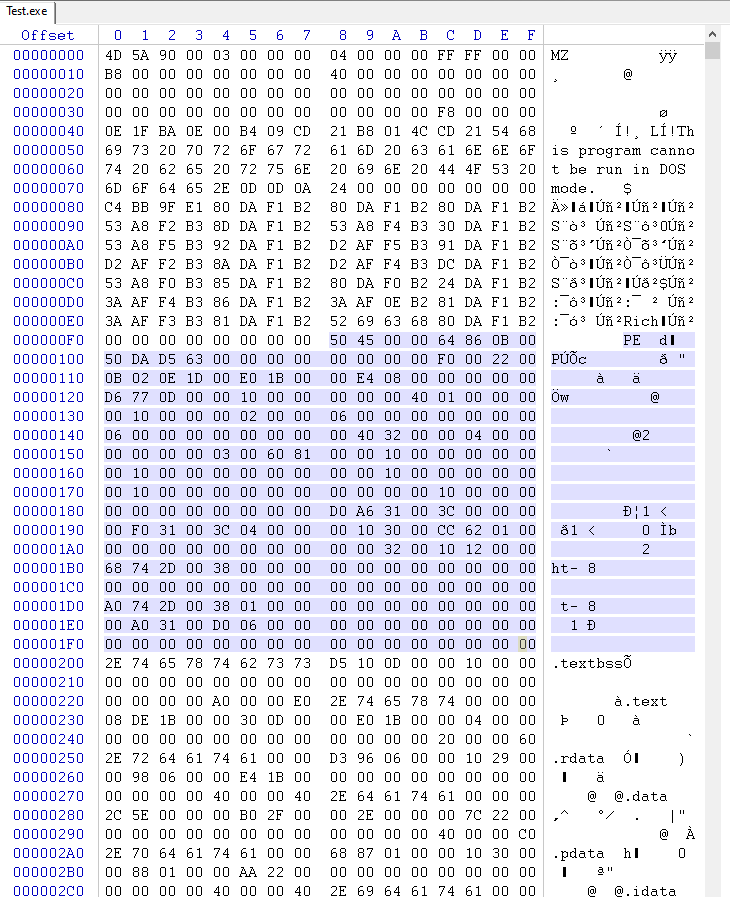
IMAGE_FILE_HEADER
IMAGE_FILE_HEADER describes the image at a high level: architecture, number of sections, timestamp, and attributes.
Microsoft documentation:
typedef struct _IMAGE_FILE_HEADER {
  WORD  Machine;
  WORD  NumberOfSections;
  DWORD TimeDateStamp;
  DWORD PointerToSymbolTable;
  DWORD NumberOfSymbols;
  WORD  SizeOfOptionalHeader;
  WORD  Characteristics;
} IMAGE_FILE_HEADER, *PIMAGE_FILE_HEADER;
Key fields:
MachineTarget CPU architecture (for exampleIMAGE_FILE_MACHINE_I386,IMAGE_FILE_MACHINE_AMD64).NumberOfSectionsCount of section headers that follow.TimeDateStampUNIX epoch seconds. Useful for debugging, versioning, triage.SizeOfOptionalHeaderSize of the optional header structure.CharacteristicsFlags such as:IMAGE_FILE_EXECUTABLE_IMAGEIMAGE_FILE_DLLIMAGE_FILE_32BIT_MACHINEIMAGE_FILE_DEBUG_STRIPPED
IMAGE_OPTIONAL_HEADER (32 and 64)
Despite the name, this header is essential. It contains memory layout information, entry point, alignments, subsystem, and the DataDirectory array. Microsoft documentation:
- https://learn.microsoft.com/en-us/windows/win32/api/winnt/ns-winnt-image\_optional\_header32
- https://learn.microsoft.com/en-us/windows/win32/api/winnt/ns-winnt-image\_optional\_header64Highlights:
Magic0x10Bfor PE32 or0x20Bfor PE32+ (64-bit).AddressOfEntryPointRVA of the entry point.ImageBasePreferred load address.SectionAlignmentandFileAlignmentAlignment in memory vs on disk.SizeOfImageandSizeOfHeadersIn-memory image size and total headers size.DataDirectory[]Pointers to import table, export table, relocations, resources, etc.
IMAGE_SECTION_HEADER
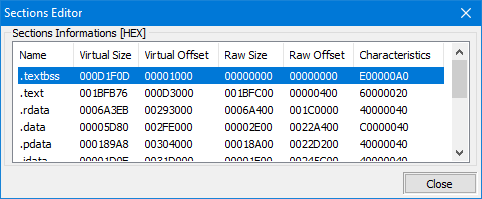
A PE is split into sections, each described by IMAGE_SECTION_HEADER. Sections are the fundamental mapping units used by the loader and by tooling.
Microsoft documentation:
#pragma pack(push, 1)
typedef struct _IMAGE_SECTION_HEADER {
  BYTE  Name[IMAGE_SIZEOF_SHORT_NAME];  // 8
  union {
    DWORD PhysicalAddress;
    DWORD VirtualSize;
  } Misc;
  DWORD VirtualAddress;
  DWORD SizeOfRawData;
  DWORD PointerToRawData;
  DWORD PointerToRelocations;
  DWORD PointerToLinenumbers;
  WORD  NumberOfRelocations;
  WORD  NumberOfLinenumbers;
  DWORD Characteristics;
} IMAGE_SECTION_HEADER, *PIMAGE_SECTION_HEADER;
#pragma pack(pop)
Typical section names:
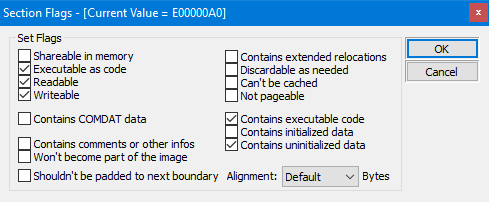
.textexecutable code.rdataread-only data.datainitialized writable data.bssuninitialized data (often virtual only).rsrcresources Images from the article: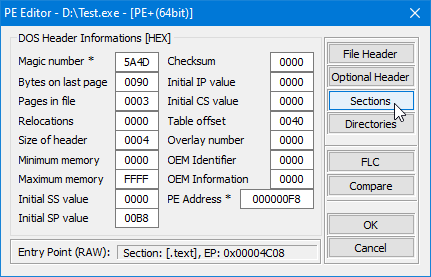
VirtualAddress vs PhysicalAddress (file offset)
In a PE, many fields are expressed as RVA (Relative Virtual Address). RVA is an address relative to the module base in memory. On disk, data is located by file offsets.If you need to access something on disk using an RVA, you must convert it using an RVA-to-file-offset translation (often called rva2offset).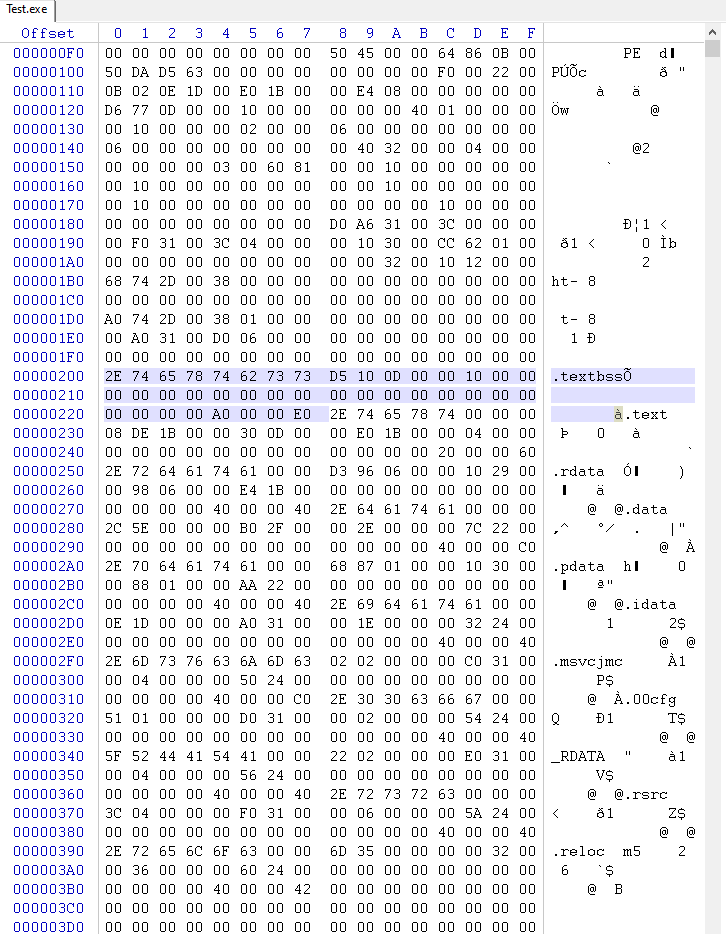
Imports
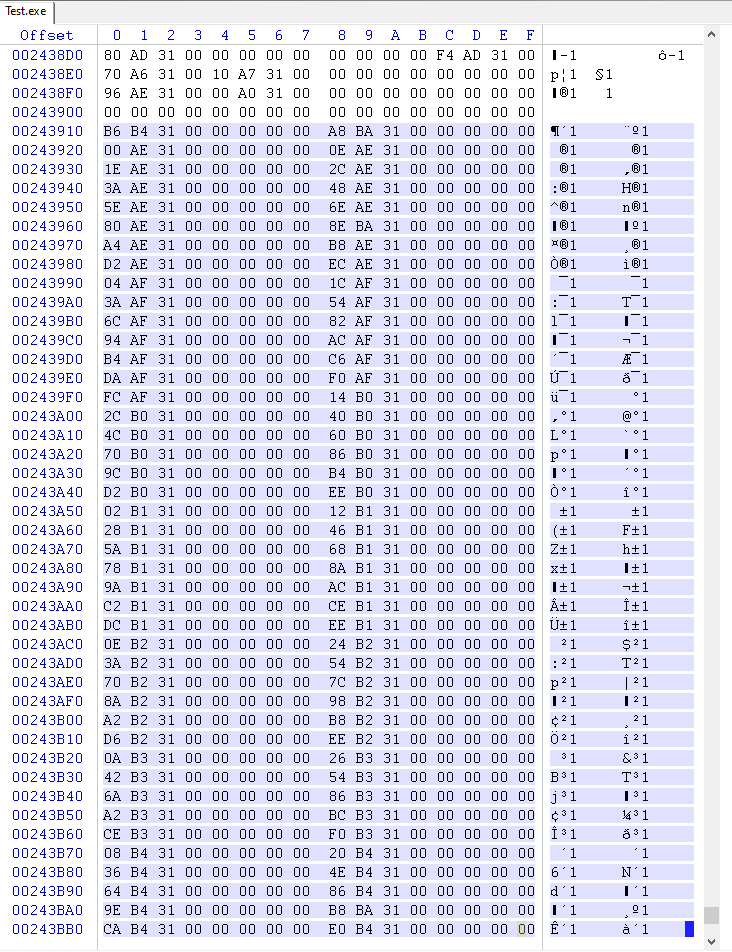
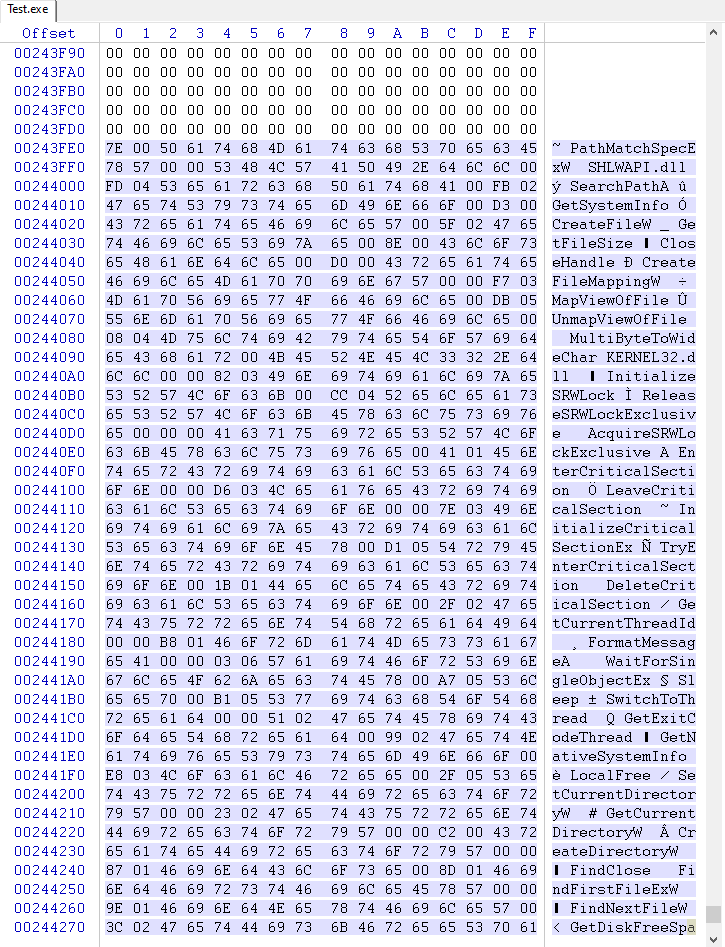
When an executable depends on external functions (for example from user32.dll or third-party DLLs), it lists those dependencies in the Import Directory.The Windows loader resolves imports at load time and fills the Import Address Table (IAT) with actual function pointers. Compilers typically generate indirect calls through the IAT.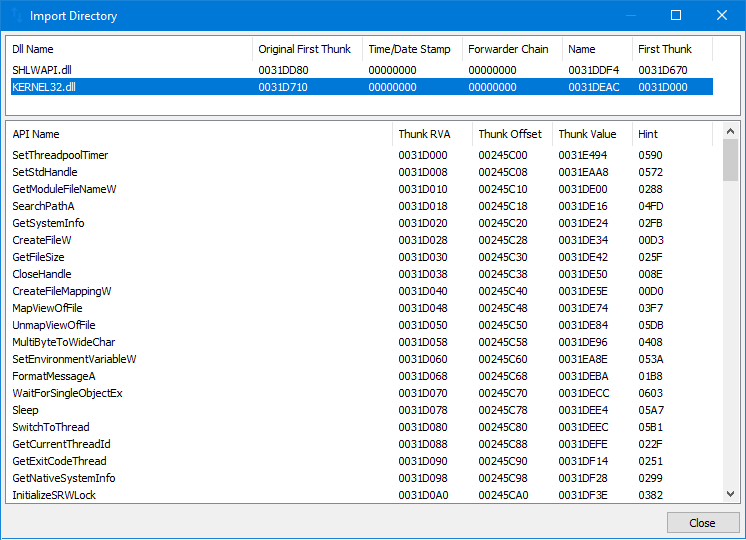
IMAGE_IMPORT_DIRECTORY (Import Directory Table)
The import directory is a sequence of IMAGE_IMPORT_DESCRIPTOR structures. Each descriptor describes one imported DLL.
typedef struct _IMAGE_IMPORT_DESCRIPTOR {
  union {
    DWORD Characteristics;        // 0 for terminating null import descriptor
    DWORD OriginalFirstThunk;     // RVA to unbound IAT (lookup table)
  } DUMMYUNIONNAME;
  DWORD TimeDateStamp;
  DWORD ForwarderChain;
  DWORD Name;                    // RVA to DLL name
  DWORD FirstThunk;              // RVA to IAT (addresses after binding)
} IMAGE_IMPORT_DESCRIPTOR;
Visualization from the article:
How the import call works
Typical compiler output calls through a cell that the loader fills once:
; x86
call dword ptr [_cell_with_address_of_function]
; x64
call qword ptr [_cell_with_address_of_function]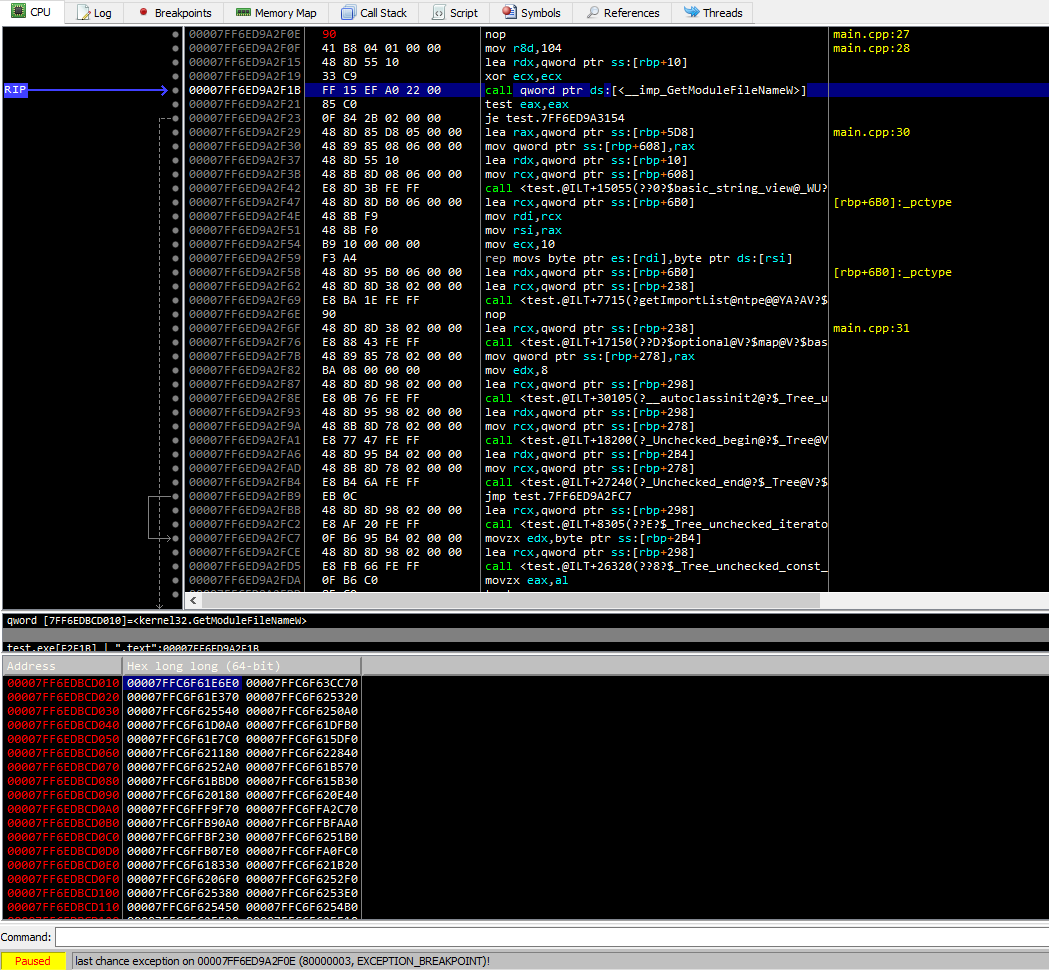 The loader only needs to write the function address once into the IAT, and the code keeps calling through it.
C++ import table parser (x86 + x64)
Below is a compact, practical approach:
- Validate DOS header and PE signature
- Detect architecture from
IMAGE_FILE_HEADER.Machine - Locate sections and data directories
- Convert RVA to file offsets (
rva2offset) - Walk
IMAGE_IMPORT_DESCRIPTORentries - For each imported function, detect import-by-name vs import-by-ordinal
Full repository: https://github.com/SToFU-Systems/DSAVE
alignUp
DWORD alignUp(DWORD value, DWORD align) {
  DWORD mod = value % align;
  return value + (mod ? (align - mod) : 0);
}
rva2offset
static constexpr int64_t kRvaError = -1;
int64_t rva2offset(const IMAGE_NTPE_DATA& ntpe, DWORD rva) {
  try {
    PIMAGE_SECTION_HEADER sec = ntpe.sectionDirectories;
    // If rva is inside headers, return as-is
    if (!ntpe.fileHeader->NumberOfSections || rva < sec->VirtualAddress) {
      return rva;
    }
    for (uint32_t i = 0; i < ntpe.fileHeader->NumberOfSections; i++, sec++) {
      DWORD secEnd = alignUp(sec->Misc.VirtualSize, ntpe.SecAlign) + sec->VirtualAddress;
      if (sec->VirtualAddress <= rva && secEnd > rva) {
        return (int64_t)rva - sec->VirtualAddress + sec->PointerToRawData;
      }
    }
  } catch (...) {
  }
  return kRvaError;
}
Import walk core idea
// Pseudocode outline
// 1) Find DataDirectory[IMPORT].VirtualAddress
// 2) Convert RVA -> file offset
// 3) Walk IMAGE_IMPORT_DESCRIPTOR until Name == 0
// 4) For each descriptor, walk thunk table until entry == 0
// 5) If high-bit set -> ordinal, else -> name (IMAGE_IMPORT_BY_NAME)
The article project implements this in a ready-to-use form, including both x86 and x64 support.
Tools used
- PE Tools: https://github.com/petoolse/petoolsOpen-source tool for manipulating PE header fields. Supports x86 and x64.
- WinDbg: https://learn.microsoft.com/en-us/windows-hardware/drivers/debugger/debugger-download-toolsMicrosoft system debugger.
- x64dbg: https://x64dbg.com/Lightweight open-source debugger for Windows.
- WinHex: http://www.winhex.com/winhex/hex-editor.htmlUniversal hex editor for forensics, recovery, and low-level data editing.
What is next
Next steps suggested in the original article:
- Build a fuzzy hashing module
- Discuss blacklists and whitelists
- Expand the tooling around PE parsing and analysis Contacts from the article: articles@stofu.io